
PNG to JPG Converter
Convert PNG images into JPG format to reduce file size and improve compatibility.
How It Works: Upload your PNG file and the tool converts it into a compressed JPG in moments.
Drop images here or click to upload
Up to 50 MB each • Convert to JPG
| Preview | Size | Format | Original Size | Output Size | Reduction | |
|---|---|---|---|---|---|---|
|
Upload images to convert to JPG |
||||||
Convert PNG images to JPG format to reduce file size, improve compatibility, and prepare images for web, sharing, and storage.
The PNG to JPG Converter transforms PNG images into compressed JPG files that are easier to upload, share, and use across different platforms. PNG is ideal for transparency and lossless quality, but it often creates larger files than JPG, especially for photos, screenshots, and detailed images.
This tool is part of our Converters and Image Tools collection for editing, converting, and optimising images.
How It Works
Upload your PNG image, and the tool converts it into JPG format instantly. Once converted, you can download a smaller, widely compatible JPG file ready for web, email, documents, or everyday use.
Understanding PNG vs JPG
PNG and JPG are both widely used image formats, but they are designed for different needs.
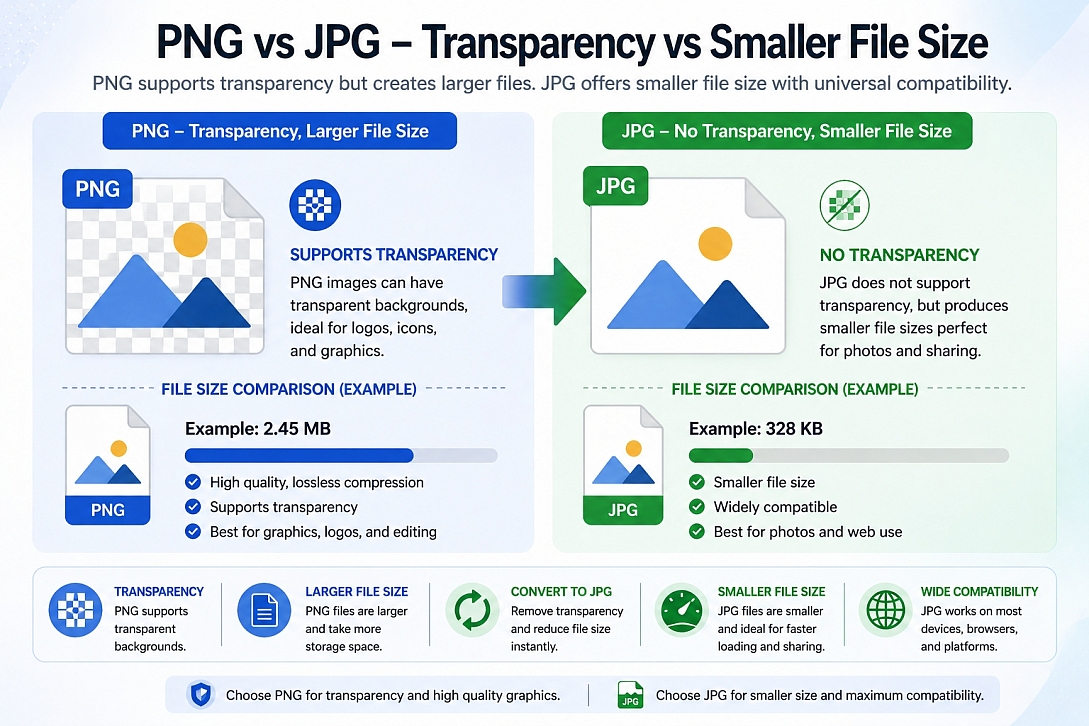
PNG uses lossless compression and supports transparency, making it useful for logos, icons, screenshots, and graphics. While JPG uses lossy compression, making it better for photos and images, where a smaller file size is more important than transparency.
- PNG: Lossless quality, transparency support, larger file sizes
- JPG: Smaller file size, universal compatibility, no transparency support
Handling Transparency When Converting PNG
PNG images may contain transparent backgrounds, which are not supported in JPG format.
- Transparent areas will be filled during conversion
- Best for photos or images without transparency
- Keep PNG if transparency is required
Why Convert PNG to JPG?
Converting PNG to JPG is useful when file size, upload compatibility, or storage efficiency matters more than transparency.
- Reduce large PNG file sizes
- Prepare images for websites and uploads
- Improve compatibility with apps and platforms
- Convert screenshots or graphics into smaller files
- Make images easier to email, store, or share
Important Transparency Note
PNG supports transparent backgrounds, but JPG does not. If your PNG includes transparency, the transparent areas will be flattened onto a background during conversion.
If you need to keep transparency, PNG is usually the better format. If transparency is not required, JPG is often more practical for smaller file sizes and broader compatibility.
How the Conversion Works
The conversion process decodes the PNG image data and re-encodes it into JPG format using JPEG compression. During this process:
- The PNG pixel data is read by the browser
- Transparent areas are flattened because JPG does not support alpha transparency
- The image is compressed using JPEG encoding
- The final JPG file is generated for download
This creates a standard JPG image that can be used in almost any browser, image editor, website, or platform.
Key Features
- PNG to JPG Conversion: Convert PNG images into standard JPG format
- Smaller File Sizes: Reduce image weight for faster uploads and sharing
- High Compatibility: Use JPG output across websites, apps, and devices
- Browser-Based Processing: Convert images without installing software
- Fast Download: Get your converted JPG file instantly
Performance & Quality Considerations
JPG compression can significantly reduce file size, but it may introduce minor compression artifacts depending on image detail and quality settings.
- Photos usually convert well from PNG to JPG
- Graphics with sharp edges may show slight compression artifacts
- Transparent PNGs will lose transparency
- Repeated conversions can reduce quality over time
For best results, keep the original PNG file if you may need transparency or lossless quality later.
Common Use Cases
- Reducing screenshot file sizes
- Preparing images for website uploads
- Converting large PNG photos into smaller JPG files
- Sharing images through email or messaging apps
- Uploading images to platforms that prefer JPG
PNG to JPG vs Other Image Conversions
- PNG to JPG: Best for reducing file size when transparency is not needed
- WebP to JPG Converter: Best for converting modern web images into a universal format
- GIF to JPG Converter: Best for extracting a static image from a GIF
- BMP to JPG Converter: Best for compressing large bitmap images
- AVIF to JPG Converter: Best for converting newer high-efficiency images for wider compatibility
Note: Although this tool is designed for PNG to JPG conversion, it also supports other formats such as WebP, GIF, BMP, and AVIF. This allows advanced users to convert multiple image types into JPG within the same workflow.
When to Use This Tool
- When your PNG file is too large
- When transparency is not required
- When you need a smaller image for web use
- When uploading to platforms that prefer JPG
- When preparing images for sharing or storage
Why Use This Tool
This tool provides a quick and simple way to convert PNG files into smaller, more compatible JPG images without using desktop editing software. It is useful when you need fast results and a format that works almost everywhere.
It is ideal for website owners, designers, bloggers, marketers, students, and anyone who needs to reduce image size or prepare PNG files for wider use.
Frequently Asked Questions
Does converting PNG to JPG reduce quality?
JPG uses lossy compression, so some quality loss may occur. In most cases, the image will still look clear while producing a smaller file size.
Will transparency be preserved?
No. JPG does not support transparency, so transparent areas in the PNG will be flattened during conversion.
Why is JPG smaller than PNG?
JPG uses lossy compression, which removes some image data to reduce file size. PNG uses lossless compression, which preserves more data but often creates larger files.
Should I use PNG or JPG for websites?
Use PNG when you need transparency or sharp graphics. Use JPG when you want smaller file sizes for photos or general web images.
Is this tool secure?
Yes. The conversion runs in your browser, so your image is processed locally without needing to upload it to a server.