
Low Poly Generator - Convert Images to Low Poly Art Online
Transform any image into stunning low poly artwork with our free online generator. Adjust mesh density, color saturation, depth effects, and border styles. Export your creations as high-quality SVG or PNG files perfect for print, web, or digital projects.
Loading ...
Low Poly Generator
Convert images to low poly art instantly. Customize mesh detail, depth, colors, and export as SVG, PNG, or JSON.
Image
Export
1x (Original)
Drag & Drop your image here
or click "Select Image" on the left
Supports JPG, PNG, WEBP
Low Poly
Settings
Custom
Filled
#000000
Colors
Original
#FFFFFF
The Ultimate Guide to Low Poly Generators: Create Stunning Geometric Art Online
Low poly art has transformed from a niche design trend into one of the most sought-after visual styles in modern digital art. Whether you are a graphic designer, game developer, or social media content creator, a low poly generator can turn any ordinary photograph into a breathtaking piece of geometric artwork in seconds.
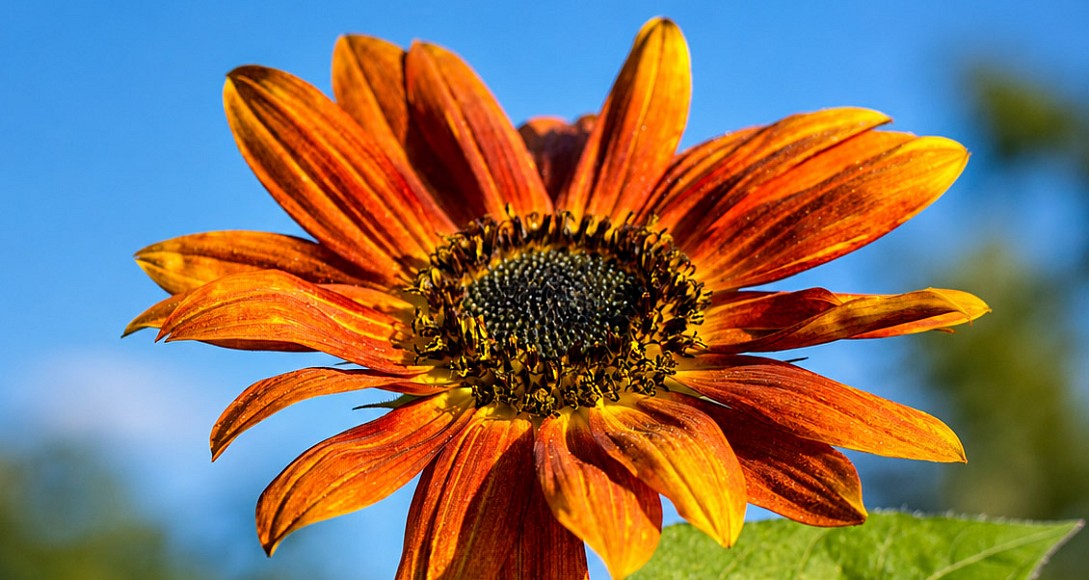
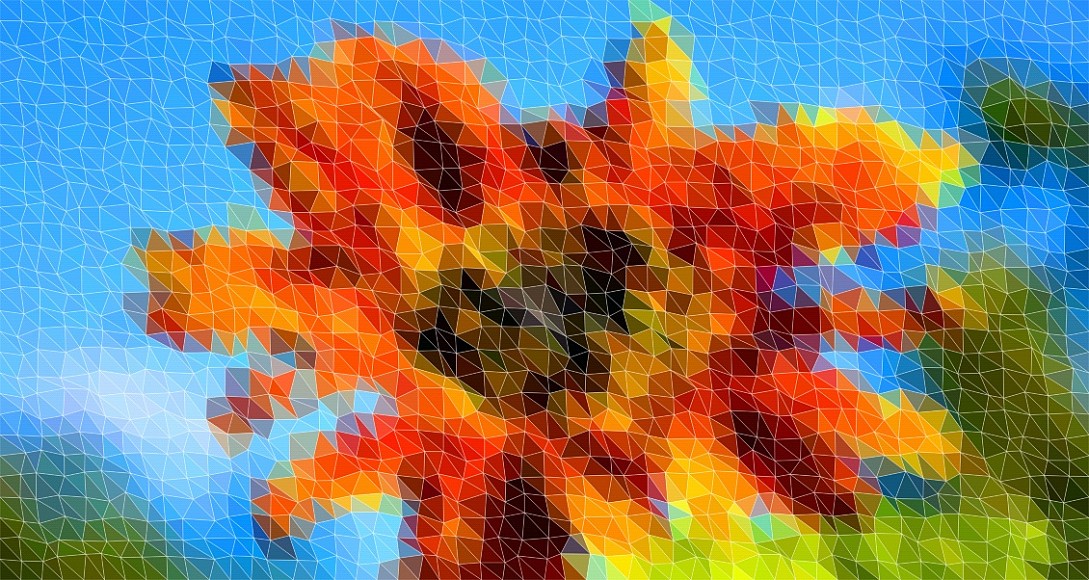
In this comprehensive guide, we will explore everything you need to know about low poly image converters, how they work, and how to use them to produce professional-quality results.
What Is a Low Poly Generator?
A low poly generator is a digital tool that converts regular images into low polygonal artwork by breaking them down into geometric shapes, typically triangles. The result is a stylized, minimalist representation of the original image that retains its core colors and composition while adding a modern, artistic aesthetic.
Low poly art originated in early 3D video games, where limited processing power forced developers to use minimal polygons. Today, it has evolved into a deliberate artistic choice used in branding, web design, NFTs, and digital illustrations.
Why Low Poly Art Is So Popular
The popularity of low poly effects stems from several factors:
- Visual appeal - The geometric simplicity creates a clean, modern look
- Versatility - Works for logos, backgrounds, social media posts, and prints
- Uniqueness - Each generated image is distinct based on mesh settings
- Scalability - SVG exports remain crisp at any size
How Does a Low Poly Image Converter Work?
Understanding the technology behind a low poly photo editor helps you make better creative decisions. Here is the step-by-step process:
The Technical Process
| Step | Process | Description |
|---|---|---|
| 1 | Image Analysis | The tool reads pixel data from your uploaded image |
| 2 | Mesh Generation | Creates a grid of points with randomized variance |
| 3 | Triangulation | Connects points to form triangular polygons |
| 4 | Color Sampling | Averages colors within each triangle |
| 5 | Rendering | Draws filled polygons with optional mesh lines |
| 6 | Export | Generates SVG or PNG output |
Key Parameters That Affect Output
Every low poly art maker uses similar core parameters to control the final result:
Detail Level - Controls the number of polygons generated. Higher values create more intricate artwork with smaller triangles.
Variance - Adds randomness to point placement, creating organic-looking meshes instead of rigid grids.
Depth - Introduces color variation within polygons, giving the artwork a 3D, faceted appearance.
Smoothing - Blurs the source image before processing, resulting in softer color transitions.
Features to Look for in a Low Poly Generator
Not all low poly generators online are created equal. Here are the essential features that separate professional tools from basic ones:
Must-Have Features
| Feature | Importance | Benefit |
|---|---|---|
| Real-time Preview | Critical | See changes instantly as you adjust settings |
| SVG Export | Critical | Vector output scales infinitely without quality loss |
| PNG Export | Critical | Raster output for immediate use in any application |
| Mesh Line Control | High | Customize border visibility, color, and width |
| Color Adjustments | High | Fine-tune saturation, brightness, and contrast |
| Posterization | Medium | Reduce color levels for stylized effects |
| Dithering | Medium | Add texture and depth to color gradients |
| Seed Control | Medium | Reproduce specific results or explore variations |
Advanced Features That Matter
Professional low poly image converters also offer:
- Comparison slider - View original and processed image side by side
- Drag and drop upload - Quick image import without browsing
- Fullscreen mode - Uninterrupted workspace for detailed work
- Clipboard copy - Instant sharing to design tools
- Responsive design - Works on desktop, tablet, and mobile
Step-by-Step Guide: Creating Low Poly Art
Follow these steps to create stunning low poly artwork using any online generator:
Step 1: Choose Your Source Image
Select a high-quality image with clear subject matter and good contrast. Portraits, landscapes, and architectural photos work exceptionally well.
Pro Tip: Images with distinct color regions produce the most visually striking low poly results. Avoid overly complex or noisy images.
Step 2: Upload and Preview
Drag your image into the tool or use the upload button. Most low poly filters will instantly generate a preview with default settings.
Step 3: Adjust Mesh Settings
Start with the detail slider to set your polygon density:
- Low detail (10-25) - Large polygons, abstract look
- Medium detail (30-60) - Balanced, recognizable subjects
- High detail (70-100) - Fine detail, photorealistic base
Step 4: Fine-Tune Visual Effects
Experiment with these settings to achieve your desired aesthetic:
- Increase variance for organic, natural-looking meshes
- Add depth for a 3D faceted appearance
- Adjust saturation to enhance or mute colors
- Use posterization for stylized, limited-palette looks
Step 5: Customize Mesh Lines
Toggle mesh lines on or off based on your preference:
- Wireframe mode - Shows only the geometric structure
- Filled mode - Solid polygons without visible borders
- Combined mode - Fills with subtle mesh lines for definition
Step 6: Export Your Creation
Choose the appropriate format for your needs:
| Format | Best For | File Size | Scalability |
|---|---|---|---|
| SVG | Web, print, logos | Small | Infinite |
| PNG | Social media, presentations | Medium | Fixed |
Use Cases for Low Poly Art
Low poly generators serve a wide range of creative and commercial purposes:
Graphic Design
- Website backgrounds and hero images
- Album covers and music artwork
- Poster and flyer designs
- Brand identity elements
Digital Marketing
- Social media post visuals
- Email newsletter headers
- Ad campaign graphics
- Infographic backgrounds
Game Development
- Environment textures
- Character concept art
- Loading screens
- UI element designs
Print and Merchandise
- T-shirt and apparel designs
- Phone case artwork
- Sticker and decal production
- Wall art and canvas prints
Low Poly vs Other Art Styles
How does low poly art compare to similar visual styles?
| Style | Characteristics | Best Use Case |
|---|---|---|
| Low Poly | Geometric triangles, faceted look | Modern branding, digital art |
| Pixel Art | Square pixels, retro aesthetic | Game sprites, nostalgic designs |
| Vector Illustration | Smooth curves, clean lines | Logos, icons, infographics |
| Watercolor | Soft edges, blended colors | Artistic prints, invitations |
| Halftone | Dot patterns, comic style | Pop art, editorial designs |
Low poly art uniquely combines the precision of vector graphics with the organic feel of hand-drawn illustrations, making it incredibly versatile across different design contexts.
Tips for Better Low Poly Results
Maximize the quality of your low poly creations with these expert tips:
Image Selection Tips
- Use high-resolution images - More pixel data means better color sampling
- Choose images with clear subjects - Faces, animals, and landscapes work best
- Avoid heavy compression - JPEG artifacts can create unwanted noise
- Prefer high-contrast images - Bold differences produce more striking results
Setting Optimization Tips
- Start with medium detail - Find the sweet spot before going extreme
- Use subtle variance - Too much randomness breaks subject recognition
- Apply minimal depth - A little goes a long way for 3D effects
- Test wireframe mode - Helps evaluate mesh quality before finalizing
Export Optimization Tips
- Use SVG for web - Smaller file size and perfect scaling
- Use PNG for social media - Universal compatibility
- Test at target size - Verify the result looks good at intended dimensions
- Keep original settings - Save your seed number to reproduce results later
Frequently Asked Questions
Is a low poly generator free to use?
Most online low poly generators offer free basic functionality. Advanced features like high-resolution exports, batch processing, or commercial licenses may require a premium subscription.
Can I use low poly art commercially?
Yes, artwork created with a low poly image converter is typically yours to use commercially. However, always check the specific tool's terms of service regarding commercial usage rights.
What image formats are supported?
Standard low poly photo editors accept JPG, PNG, and WEBP formats. Some advanced tools also support GIF, BMP, and TIFF files.
How long does processing take?
Modern low poly generators online process images in real-time. Most adjustments update the preview instantly, while final exports typically complete within 1-3 seconds depending on image size and complexity.
Can I edit the SVG output?
Absolutely. SVG files are vector-based and can be opened in Adobe Illustrator, Inkscape, Figma, or any vector editing software for further customization.
What is the best detail level for portraits?
For facial portraits, a medium-to-high detail level (50-80) typically produces the best results, preserving facial features while maintaining the distinctive low poly aesthetic.
Why Choose an Online Low Poly Generator?
Using a web-based low poly art maker offers several advantages over desktop software:
| Advantage | Description |
|---|---|
| No Installation | Works directly in your browser |
| Cross-Platform | Compatible with Windows, Mac, Linux, and mobile |
| Always Updated | Access the latest features automatically |
| No Hardware Requirements | Processes images using your device's resources efficiently |
| Instant Access | Start creating immediately without setup |
A low poly generator is an essential tool for anyone looking to create modern, geometric artwork quickly and professionally. Whether you are designing a brand identity, creating social media content, or exploring digital art, these tools provide the perfect balance of automation and creative control.
By understanding the key parameters, following best practices, and experimenting with different settings, you can transform any ordinary photograph into extraordinary low poly art that captures attention and elevates your visual content.
Start experimenting with a free online low poly generator today and discover how this versatile art style can enhance your creative projects. The combination of instant results, professional quality, and endless customization possibilities makes low poly generation one of the most accessible and rewarding forms of digital art creation available.
Remember: The best low poly artwork comes from experimentation. Try different images, adjust settings beyond the defaults, and develop your unique style within this beautiful geometric medium.
0.0338