

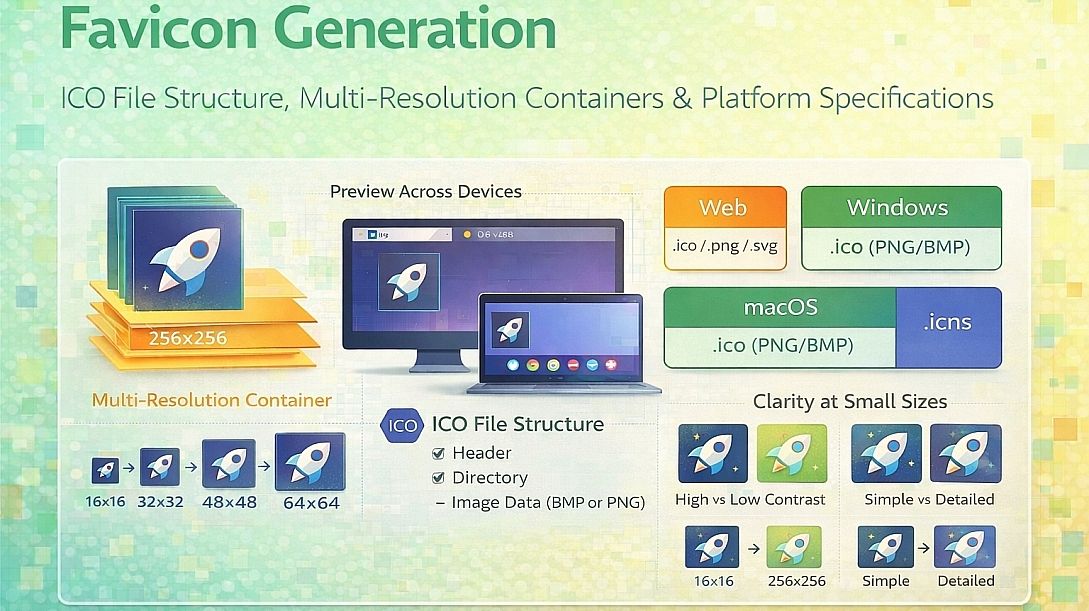
Favicon Generation: ICO File Structure, Multi-Resolution Containers & Platform Specifications
A favicon (favorites icon) appears in browser tabs, bookmarks, history menus, and address bars. Unlike standard images, favicons require multiple resolutions within a single file or coordinated set of files. The ICO format stores multiple images in one container. Modern browsers also support PNG, SVG, and platform-specific icons. Understanding the container format and platform requirements ensures the icon displays correctly across all browsers and devices.
Summary of core favicon concepts:
- ICO container: Single file holding multiple resolutions (16x16, 32x32, 48x48, 64x64, 256x256)
- PNG favicon: Modern alternative using separate files linked via HTML
- SVG favicon: Scalable vector format for crisp display at any size
- Platform-specific icons: Apple touch icons (iOS), Android adaptive icons, Windows tile icons
- Fallback chain: Browsers request icons in priority order; providing multiple formats ensures compatibility
How the ICO File Format Works
The ICO format is a container, not a compression method. It stores multiple independent images with their own headers and pixel data. The file structure consists of:
- ICONDIR (6 bytes): Reserved field (2 bytes), image type (2 bytes, 1 for ICO), image count (2 bytes)
- ICONDIRENTRY (16 bytes per image): Width (1 byte), height (1 byte), color count (1 byte, 0 for 256+ colors), reserved (1 byte), color planes (2 bytes, typically 1), bits per pixel (2 bytes, 32 for true color with alpha), image size (4 bytes), image offset (4 bytes)
- Bitmap data (variable per image): AND bitmap (monochrome mask for transparency), XOR bitmap (color data), or PNG-compressed data for newer ICO files
Older ICO files use separate AND and XOR bitmaps. The AND bitmap defines transparency: 1 for transparent, 0 for opaque. The XOR bitmap contains the color data. The two combine during rendering. This format does not support partial transparency (alpha blending). Pixels are either fully opaque or fully transparent.
Newer ICO files (Windows Vista and later) embed PNG-compressed image data. PNG supports full alpha transparency (0-255). The icon directory entry points to a PNG chunk instead of separate AND/XOR bitmaps. Most modern browsers and operating systems support PNG-in-ICO.
Standard ICO resolutions and bit depths:
| Resolution | Bit Depth | Use Case |
|---|---|---|
| 16x16 | 32-bit (with alpha) | Browser tab, address bar |
| 32x32 | 32-bit (with alpha) | Taskbar, desktop shortcuts |
| 48x48 | 32-bit (with alpha) | Start menu, Alt-Tab switcher |
| 64x64 | 32-bit (with alpha) | High-DPI displays (125-150% scaling) |
| 256x256 | 32-bit (with alpha) | Windows 7/10/11 large icon view |
Windows does not scale smaller icons up. If a 256x256 icon is missing, Windows will not enlarge a 48x48 icon. Each resolution must be present for optimal display at that size.
HTML Link Tags for Modern Favicon Delivery
The classicfavicon.icoin the root directory works but provides no control. Modern favicon delivery uses multiple link tags targeting specific browsers and devices.
<!-- ICO for legacy browsers (IE, older Chrome/Firefox) -->
<link rel="icon" type="image/x-icon" href="/favicon.ico">

<!-- PNG for modern browsers (preferred over ICO) -->
<link rel="icon" type="image/png" sizes="32x32" href="/favicon-32x32.png">
<link rel="icon" type="image/png" sizes="16x16" href="/favicon-16x16.png">

<!-- Apple touch icon (iOS, iPadOS, macOS Safari) -->
<link rel="apple-touch-icon" sizes="180x180" href="/apple-touch-icon.png">

<!-- Android Chrome (deprecated but widely supported) -->
<link rel="manifest" href="/site.webmanifest">

<!-- Windows 8/10/11 tile icon -->
<meta name="msapplication-TileColor" content="#ffffff">
<meta name="msapplication-TileImage" content="/mstile-144x144.png">

<!-- Theme color for browser UI -->
<meta name="theme-color" content="#ffffff">Thesite.webmanifestfile (JSON format) controls Android Chrome behavior:
{
    "name": "Site Name",
    "short_name": "Site",
    "icons": [
        {
            "src": "/android-chrome-192x192.png",
            "sizes": "192x192",
            "type": "image/png"
        },
        {
            "src": "/android-chrome-512x512.png",
            "sizes": "512x512",
            "type": "image/png"
        }
    ],
    "theme_color": "#ffffff",
    "background_color": "#ffffff",
    "display": "standalone"
}
Browser and Platform Request Behavior
Browsers request favicons in a specific order. Understanding this order prevents unnecessary file requests and ensures the correct icon loads.
Desktop Chrome/Edge (Windows/Mac):
- Checks for
link rel="icon"with typeimage/pngand matching sizes - Checks for
link rel="icon"with typeimage/x-icon - Requests
/favicon.icofrom root - Requests
/favicon.pngif ICO is missing (recent versions)
Firefox:
- Checks for
link rel="icon"(any format) - Requests
/favicon.icofrom root - Supports SVG favicons (unique among major browsers)
Safari (macOS/iOS):
- Checks for
link rel="apple-touch-icon" - Checks for
link rel="icon" - Requests
/favicon.icoonly as a last resort - Does not support SVG favicons
Android Chrome:
- Reads
site.webmanifestfor icons - Falls back to
link rel="icon" - Requests
/favicon.icoas fallback
Bots and crawlers (Google, Bing):
- Request
/favicon.icoby default - May also check for
link rel="icon"in HTML
The safest approach: provide/favicon.ico(16x16, 32x32, 48x48 multi-resolution ICO) for bots and legacy browsers, plus PNG links for modern browsers, plus Apple touch icon for iOS devices.
Five Practical Use Cases for Favicon Generation
Standard Website Favicon (Desktop and Mobile)
Specific constraints: The icon must display correctly in browser tabs (16x16), bookmarks (32x32), and mobile home screens (180x180). Each size requires different detail levels. A complex logo becomes illegible at 16x16.
Common mistakes: Using the same PNG file for all sizes. A 180x180 Apple icon scaled down to 16x16 loses detail. Using a photograph or complex illustration as a favicon. At 16x16, the image becomes unrecognizable. Providing only an ICO file, iOS devices ignore the ICO and show a default icon.
Practical advice: Start with a vector source (SVG or high-resolution PNG). Design at 512x512, then test at 16x16, 32x32, 48x48, and 180x180. Simplify aggressively. Remove gradients, fine lines, and small text. Use solid colors with high contrast. For the 16x16 version, a single recognizable shape (letter, simple icon, or logo mark) works best. Generate all required sizes from the same source.
Web Application with Home Screen Installation (PWA)
Specific constraints: Progressive Web Apps (PWAs) install on user devices. The icon appears on the home screen alongside native apps. Missing or incorrectly sized icons break the installation experience. Different Android devices have different icon shape requirements (round, squircle, square with rounded corners).
Common mistakes: Providing only a 192x192 icon. Modern Android devices require 512x512 for high-resolution displays. Using a white icon on a white background, the system may crop or mask the icon unpredictably. Omitting thesite.webmanifestfile.
Practical advice: Generate icons at 192x192 and 512x512. Use a transparent background with a colored shape, or use a solid background with a contrasting foreground. Test using Chrome DevTools (Application > Manifest). The maskable icon specification defines safe zones: keep important content within the central 80% of the icon (160x160 of 192x192, 410x410 of 512x512). Usepurpose: "maskable"in the manifest for Android adaptive icons.
Multi-Domain and Subdomain Setup
Specific constraints: A company with multiple subdomains (blog.example.com, shop.example.com, support.example.com) wants consistent branding but may want subdomain-specific variations. Browsers cache favicons aggressively, causing outdated icons to persist.
Common mistakes: Using the same favicon file path across all subdomains without versioning. Browsers cache per subdomain, but a change on one subdomain does not invalidate the cache on others. Omitting thetypeattribute in link tags, causing some browsers to re-download the icon unnecessarily.
Practical advice: Place a shared favicon set atexample.com/favicons/and reference absolute paths from each subdomain:href="https://example.com/favicons/favicon.ico". Use query string versioning for updates:href="/favicon.ico?v=2". For subdomain-specific variations, use different file names:favicon-blog.ico,favicon-shop.ico. Clear browser caches during deployment by changing the version parameter.
Email Client and RSS Feed Favicons
Specific constraints: Email clients (Outlook, Gmail, Apple Mail) and RSS readers display favicons alongside messages and feed items. These applications use different retrieval methods. Some fetch/favicon.icodirectly without parsing HTML. Others use Google's favicon service or other third-party APIs.
Common mistakes: Assuming email clients will read HTML link tags. Most do not. They request/favicon.icodirectly from the domain root. Providing an ICO file that contains only 16x16 and 32x32 but not 48x48 or 64x64. Some email clients resize aggressively, causing pixelation.
Practical advice: Place a multi-resolution ICO file at the domain root (/favicon.ico). Include at minimum 16x16, 32x32, and 48x48 at 32-bit color depth. Test using email testing services that show how favicons appear in different clients. For RSS feeds, include a<logo>or<icon>element in the feed XML pointing to a PNG file.
Dark Mode and Light Mode Favicons
Specific constraints: Modern browsers support dark mode. A favicon designed for light backgrounds (dark logo on white) becomes invisible on dark browser themes. Browsers do not automatically switch favicons based on color scheme.
Common mistakes: Using a single favicon for both light and dark modes. Users with dark mode enabled see a white browser UI but a dark icon that blends into the address bar. Assuming browsers will handle switching automatically.
Practical advice: Use themediaattribute withprefers-color-schemeto serve different favicons:
<link rel="icon" type="image/png" sizes="32x32"
      href="/favicon-light-32x32.png"
      media="(prefers-color-scheme: light)">
<link rel="icon" type="image/png" sizes="32x32"
      href="/favicon-dark-32x32.png"
      media="(prefers-color-scheme: dark)">
For ICO files (which do not supportmedia), provide a transparent background with a colored shape that works on both light and dark backgrounds. A colored circle with a cutout shape (like a "negative space" logo) adapts to any background.
Technical Comparison: Favicon Formats and Generation Tools
| Format | Multi-resolution | Alpha Transparency | Browser Support | File Size | Best Use Case |
|---|---|---|---|---|---|
| ICO (legacy) | Yes | 1-bit (AND/XOR) | Universal | Large (multiple embedded) | Legacy browsers, root fallback |
| ICO (PNG) | Yes | Full (8-bit) | Vista+, modern browsers | Moderate | Windows, general fallback |
| PNG (separate files) | No (one size per file) | Full | All modern browsers | Small per file | Recommended primary format |
| SVG | No (scales infinitely) | Full | Firefox, Chrome, Edge (not Safari) | Very small | Modern, Safari-incompatible |
| Apple touch PNG | No | Full (iOS expects opaque) | iOS, macOS Safari | Small | Apple devices only |
For users who need immediate favicon generation without understanding ICO file structures or creating multiple sizes manually, online favicon generators implement the same multi-resolution export and HTML tag generation described here. These browser-based tools are suitable for single projects, quick testing, and situations where graphic design software is unavailable. The tradeoff is reduced control over individual pixel adjustments at each size compared to manual editing. A functional example is the Favicon Generator, which creates ICO files with multiple resolutions, PNG exports for all standard sizes, Apple touch icons, and manifest.json generation.
Advanced Techniques: SVG Favicons and Animated Icons
SVG favicons offer infinite scalability and small file sizes. The SVG can contain paths, shapes, and even CSS animations. Firefox and Chromium-based browsers support SVG favicons. Safari does not. The solution is progressive enhancement: provide SVG vialink rel="icon" type="image/svg+xml"and PNG fallback via additional link tags.
Example SVG favicon with dark mode support using CSS media queries inside SVG:
<svg xmlns="http://www.w3.org/2000/svg" viewBox="0 0 100 100">
  <style>
    rect { fill: #333; }
    @media (prefers-color-scheme: dark) {
      rect { fill: #fff; }
    }
  </style>
  <rect width="100" height="100" rx="20"/>
  <text x="50" y="68" text-anchor="middle" font-size="48" fill="white">T</text>
</svg>
Animated ICO files are not supported. Browsers do not animate ICO or PNG favicons. Some browsers support animated SVG favicons (Firefox, Chrome). The animation runs continuously, which can be distracting. Use animated favicons only for notifications (incoming message, completed task) and stop the animation after a few cycles.
ICO compression optimization: ICO files store each resolution uncompressed (legacy AND/XOR) or PNG-compressed. PNG-compressed ICO files are smaller. To optimize, generate ICO from PNG sources using tools that prioritize PNG compression. Remove unnecessary resolutions. A typical optimal set: 16x16, 32x32, 48x48, 256x256. Skipping 64x64 and 128x128 reduces file size by 30-40% with minimal visible difference on most displays.
Common Pitfalls and Corrected Misconceptions
Misconception: A single PNG file works everywhere. False. ICO is required for legacy browsers and some crawlers. Apple touch icons require a separate PNG with specific naming or link tags. Android Chrome requires a manifest file. One file cannot satisfy all requirements.
Misconception: Larger favicons are always better. Larger favicons (256x256, 512x512) are necessary for high-DPI displays and home screens. However, serving a 512x512 PNG as the primary favicon wastes bandwidth. The browser downloads the file even though it displays at 16x16. Use separate files for each size.
Misconception: Favicons update immediately after changing the file. Browsers cache favicons aggressively. Cache duration ranges from days to indefinite. Use cache-busting (query string version parameter) or change the filename. Hard refresh (Ctrl+F5) may not update favicons in some browsers.
Misconception: All browsers support PNG favicons. Modern browsers do. Internet Explorer 10 and earlier do not. Windows 7 and earlier systems may still use these browsers. Provide an ICO fallback for these cases.
Misconception: The favicon must be square. The ICO format and browser expectations assume square icons. Non-square images will be cropped or stretched. Always provide square source images. The browser handles display in non-square containers (address bar, bookmarks) by centering and padding.
Step-by-Step Decision Method for Favicon Generation
Step 1: Create source artwork. Use vector format (SVG, AI, EPS) or high-resolution PNG at 512x512 minimum. Design with simplicity: bold shapes, high contrast, no text smaller than 1/10 of icon size.
Step 2: Test at target sizes. Scale the source to 16x16, 32x32, 48x48, 180x180, 192x192, and 512x512. Verify legibility at each size. Simplify further if needed.
Step 3: Generate PNG files. Export at 16x16, 32x32, 48x48, 180x180 (Apple), 192x192 (Android), and 512x512 (Android high-res). Use PNG with full alpha transparency.
Step 4: Generate ICO file. Combine 16x16, 32x32, 48x48, and 256x256 into a single ICO file. Ensure the ICO uses PNG compression (modern format) rather than legacy AND/XOR.
Step 5: Generate manifest.json. Create a web manifest file pointing to the 192x192 and 512x512 icons. Include theme_color and background_color.
Step 6: Write HTML link tags. Include all link tags in the<head>section. Order by specificity: SVG first (if used), then PNG with sizes, then ICO as a fallback.
Step 7: Place files. Place the ICO at/favicon.icoin the root directory. Place all other files in a/favicons/subdirectory. Update paths in link tags accordingly.
Step 8: Test across browsers. Use browser developer tools to verify correct file requests. Test on Windows (Chrome, Firefox, Edge), macOS (Safari, Chrome, Firefox), iOS (Safari), and Android (Chrome).
Step 9: Implement cache-busting. Add a version parameter to all favicon links. Update the version number whenever files change.
Technical Answers to Specific User Questions
What is the minimum set of favicon files for modern websites? Five files: favicon.ico (16,32,48), favicon-32x32.png, favicon-16x16.png, apple-touch-icon.png (180x180), site.webmanifest. This set covers all current browsers and devices.
Why does my favicon show correctly locally but not after deployment? Caching. The browser cached the missing or old favicon from the first request. Clear browser cache or use a different browser. Add?v=2to the URL to force re-download.
Can I use a transparent favicon? Yes. PNG and modern ICO formats support full alpha transparency. Legacy ICO (AND/XOR) supports only binary transparency (on/off). Safari on iOS may add a background to transparent icons. Test on target devices.
What size should an Apple Touch icon be? 180x180 pixels. Older devices used 152x152 (iPhone) or 167x167 (iPad). Modern iOS uses 180x180 and scales down. Provide a single 180x180 PNG. Do not use ICO format.
How do I create a favicon that works in dark mode? Use two PNG files with themediaattribute in link tags, or design a single icon with a transparent background and a shape that works on both light and dark colors. A colored circle with a cutout shape (like a monogram) adapts to any background.
Related Tools on Toolonic:
- Favicon Generator – Apply the methods above instantly in your browser
- Image Cropper – Crop source images to a square before favicon generation
- Image Enhancer – Adjust contrast and brightness of favicon source artwork
LEAVE A COMMENT
Recent Posts

0.0369