

Free Online Photography Tools Every Photographer & Ecommerce Store Needs
Photography has become an essential part of modern digital life. Whether you're running an ecommerce store, building a personal portfolio, posting on social media, or preserving family memories, high-quality images matter more than ever.
The challenge is that professional image editing software can be expensive, complicated, and time-consuming. That’s why free online photography tools are becoming increasingly popular for creators, small businesses, and online sellers.
At Toolonic, users can access fast, browser-based image tools that help improve, resize, sharpen, crop, compress, and enhance photos without installing software.
Let's have a look at how different types of photography benefit from online editing tools and how photographers, ecommerce brands, and everyday users can streamline their workflow.
Why Online Photography Tools Are Growing in Popularity
Traditional desktop editing software often requires:
- Expensive subscriptions
- High-performance computers
- Complex learning curves
- Large storage space
Online tools simplify the process by allowing users to edit images directly in their browser. This is especially useful for:
- Ecommerce businesses
- Social media creators
- Bloggers
- Students
- Freelancers
- Hobby photographers
- Small marketing teams
With cloud-based workflows becoming more common, fast online image utilities save time while maintaining image quality.
Ecommerce Photography: The Importance of Optimized Product Images
Ecommerce photography is one of the most important factors influencing online sales. Customers cannot physically inspect products, so images become the primary decision-making tool.
A good example is an online luxury watch store. Imagine an ecommerce brand selling premium watches:
- Close-up images showcase craftsmanship
- Sharp details highlight textures and materials
- Optimized file sizes improve website speed
- Consistent image dimensions create a professional storefront
If product images load slowly or appear blurry, customers may lose trust in the brand. This is where online photography tools become extremely useful.
Compress Product Photos Without Losing Quality
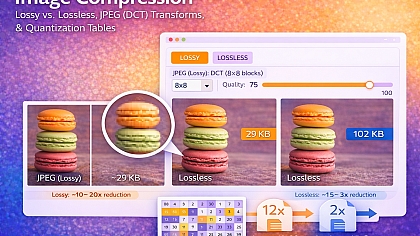
Large product photos can slow down websites and negatively impact SEO rankings. Using the Toolonic Image Compressor helps ecommerce stores reduce file sizes while preserving visual quality.
Benefits include:
- Faster page loading speeds
- Better mobile performance
- Improved customer experience
- Reduced storage usage
- Better SEO performance
For a watch ecommerce store, this means high-resolution product images can remain sharp while loading quickly across desktop and mobile devices.
Social Media Photography and Content Creation

Content creators and influencers constantly need optimized visuals for:
- TikTok
- YouTube thumbnails
- Blogs
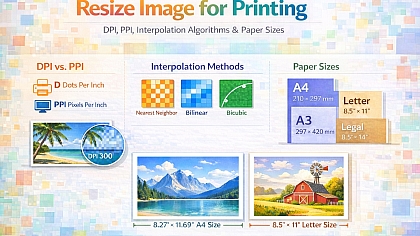
Different platforms require different image sizes and aspect ratios. Instead of manually editing dimensions in complicated software, creators can quickly adjust visuals using our free Resize Image for Printing Tool.
This is useful for:
- Instagram posts
- Facebook cover photos
- Pinterest pins
- YouTube thumbnails
- Marketing banners
Consistent sizing improves professionalism and branding across platforms.
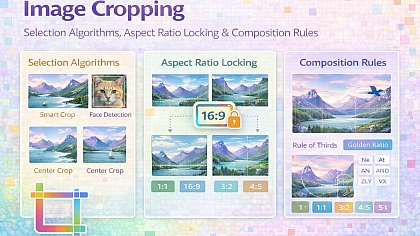
Cropping Photos for Better Composition
Cropping is one of the simplest but most powerful photography techniques. A well-cropped image can:
- Remove distractions
- Improve framing
- Emphasize the subject
- Create platform-specific dimensions
Our Free Online Image Cropper allows photographers and creators to quickly refine compositions directly in their browser. For example:
- A travel photographer may crop landscape shots for Instagram
- An ecommerce clothing store may crop products for catalog uniformity
- A real estate agent may adjust room images for listing platforms
Simple edits often make a dramatic difference in visual presentation.
Sharpening Images for Professional Results
Sharpness is critical in photography. Blurry or soft images can reduce perceived quality, especially for:
- Jewelry photography
- Watch photography
- Product photography
- Food photography
- Portrait photography
A luxury watch store, for example, needs sharp macro images that clearly display:
- Dial details
- Metal textures
- Branding
- Glass reflections
- Watch hands


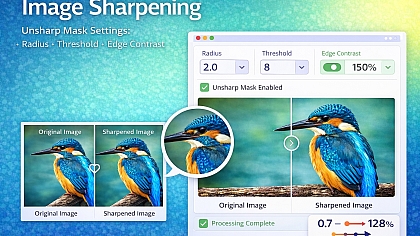
Using our Image Sharpener Tool can help enhance image clarity and improve professional presentation. Sharpening tools are also useful for:
- Restoring slightly soft mobile photos
- Improving scanned images
- Refining ecommerce listings
- Enhancing blog visuals
Enhancing Old or Low-Quality Photos
Not every image starts with perfect lighting or professional equipment. Many users work with:
- Smartphone images
- Older digital photos
- Scanned photographs
- Low-light images
- Social media downloads
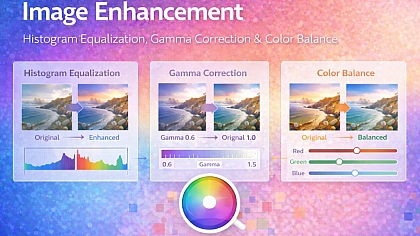
Our free Online Image Enhancer can improve brightness, clarity, and overall image quality in seconds. This is especially useful for:
Personal Photography
Families often want to restore or improve:
- Vacation memories
- Wedding photos
- Childhood images
- Archived family pictures
Small Business Marketing
Small businesses frequently need affordable ways to improve visuals for:
- Menus
- Flyers
- Ecommerce stores
- Social media ads
- Website banners
Online enhancement tools provide a quick solution without needing advanced editing skills.
Photography Types That Benefit From Online Editing Tools

Different photography niches require different editing workflows.
Product Photography
Used by:
- Ecommerce brands
- Amazon sellers
- Shopify stores
- Watch retailers
- Jewelry businesses
Needs:
- Compression
- Sharpening
- Cropping
- Resizing
Portrait Photography
Used by:
- Photographers
- Influencers
- Personal branding professionals
Needs:
- Enhancement
- Cropping
- Social media sizing
Real Estate Photography
Used by:
- Realtors
- Airbnb hosts
- Property marketers
Needs:
- Brightness enhancement
- Resizing
- Compression for fast-loading listings
Food Photography
Used by:
- Restaurants
- Food bloggers
- Delivery apps
Needs:
- Sharpness
- Color enhancement
- Social-ready cropping
Travel Photography
Used by:
- Bloggers
- Tourism businesses
- Content creators
Needs:
- Optimization for websites
- Social media formatting
- Fast image loading
Why Website Speed Matters for Photography
One of the biggest mistakes websites make is uploading oversized images. Large image files can:
- Slow down pages
- Increase bounce rates
- Hurt Google rankings
- Reduce conversions
For ecommerce stores, slow-loading product pages directly affect sales. Optimized photography is now both a design requirement and an SEO strategy.
That’s why tools like the Toolonic Image Compressor are valuable not only for photographers but also for digital marketers and online businesses.
Browser-Based Editing Saves Time
One major advantage of online photography tools is convenience.
Users can:
- Edit from any device
- Avoid software downloads
- Work directly in the browser
- Quickly optimize images
- Handle multiple workflows efficiently
This is especially beneficial for:
- Remote teams
- Freelancers
- Ecommerce managers
- Social media marketers
Photography today is no longer limited to professional studios. Every online business, content creator, and personal brand relies on quality visuals.
Free online tools make professional-quality editing more accessible to everyone.
Whether you are:
- Running an ecommerce watch store
- Growing a social media account
- Managing a photography blog
- Optimizing product listings
- Preserving personal memories
Browser-based tools can dramatically simplify your workflow. Explore the free photography tools available at Toolonic to compress, crop, sharpen, resize, and enhance your images quickly and efficiently.
LEAVE A COMMENT
Recent Posts


0.0382