

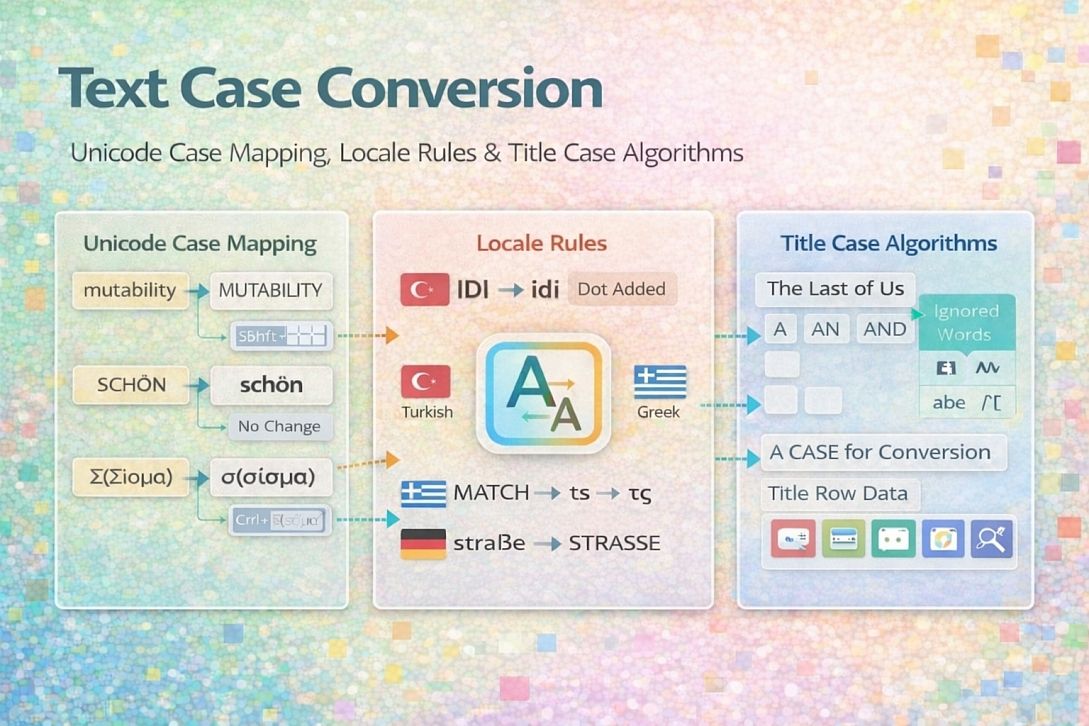
Text Case Conversion: Unicode Case Mapping, Locale Rules & Title Case Algorithms
Text case conversion changes the capitalization of letters. Lowercase, uppercase, title case, and sentence case each serve different contexts. Unlike simple ASCII text, Unicode introduces complexity: different languages have different case mapping rules, and some characters change length when cased (e.g., German "ß" becomes "SS"). Understanding the underlying case mapping standards ensures conversions work correctly across languages and platforms.
Summary of core case conversion concepts:
- Unicode case mapping: Three mapping types (lowercase, uppercase, titlecase) are defined in the Unicode Character Database
- Locale-specific rules: Turkish dotted/dotless I, Greek final sigma, Lithuanian dot accent preservation
- Title case algorithms: First letter uppercase, rest lowercase, with exceptions for articles and conjunctions
- Case folding: Case-insensitive comparison using normalized case mappings
- Context-sensitive mapping: Characters whose case depends on adjacent characters or word position
How Unicode Case Mapping Works
Unicode assigns every character a set of case mapping properties. The Unicode Character Database (UCD) contains these mappings. Three distinct case mapping operations exist:
Lowercase mapping (toLower): Converts a character to its lowercase equivalent. For most characters, this is a 1:1 mapping. 'A' → 'a', 'B' → 'b'.
Uppercase mapping (toUpper): Converts a character to its uppercase equivalent. 'a' → 'A', 'b' → 'B'.
Titlecase mapping (toTitle): Converts a character to its titlecase form. For most characters, titlecase equals uppercase. For digraphs and ligatures, titlecase may differ. 'dž' (U+01C6 Latin small letter dz) → 'Dž' (U+01C5 Latin capital letter d with small letter z), not 'DŽ' (U+01C4 Latin capital letter dz).
Some characters have 1:2 or 1:3 mappings:
| Character | Code Point | Lowercase | Uppercase | Titlecase |
|---|---|---|---|---|
| 'ß' (German sharp s) | U+00DF | 'ß' (no lowercase) | 'SS' | 'Ss' |
| 'fi' (ligature fi) | U+FB01 | 'fi' | 'FI' | 'Fi' |
| 'İ' (dotted I) | U+0130 | 'i' | 'İ' | 'İ' |
| 'ı' (dotless i) | U+0131 | 'ı' | 'I' | 'I' |
Case mapping can be context-sensitive. The Greek final sigma (ς) appears only at the end of words. The standard sigma (σ) appears elsewhere. Uppercase mapping converts both to Σ (U+03A3). Lowercase mapping must know word boundaries to choose σ or ς.
Case folding (toCaseFold) is a separate operation for case-insensitive comparison. It maps characters to a common form, often removing case distinctions entirely. 'Straße' case-folds to 'STRASSE', matching 'STRASSE'. Regular case mapping would produce 'strasse' (lowercase) and 'STRASSE' (uppercase), which do not compare equal.
Locale-Specific Case Mapping Rules
Different languages have conflicting case mapping requirements. The same Unicode code point may map differently depending on the user's locale.
Turkish and Azerbaijani (dotted/dotless I):
| Character | Name | Lowercase | Uppercase |
|---|---|---|---|
| I | Latin capital letter I | ı (dotless i, U+0131) | I |
| İ | Latin capital letter I with dot above | i | İ |
| i | Latin small letter i | i | İ |
| ı | Latin small letter dotless i | ı | I |
English rules: 'i' uppercase is 'I', 'I' lowercase is 'i'. Turkish rules: 'i' uppercase is 'İ', 'I' lowercase is 'ı'. Using English rules on Turkish text corrupts words. 'İstanbul' becomes 'istanbul' (losing the dot), changing pronunciation. Using Turkish rules on English text breaks 'Internet' (becoming 'İnternet').
Greek (final sigma):
| Context | Lowercase | Uppercase |
|---|---|---|
| Beginning or middle of word | σ (U+03C3) | Σ (U+03A3) |
| End of word | ς (U+03C2) | Σ (U+03A3) |
| All uppercase | Σ (U+03A3) | Σ (U+03A3) |
Lowercasing 'ΣΥΝΑΞΗ' (SYNAXI) requires detecting word boundaries. The result should be 'συναξη' (all medial sigma) or 'σύναξη' (with accent), not 'συναξε' (incorrect final sigma).
Lithuanian (dot accent preservation):
Lithuanian preserves the dot above 'i' and 'į' when uppercasing in certain contexts. 'į' (U+012F, i with ogonek) uppercase should be 'Į' (U+012E) with dot retained. ASCII 'i' uppercase remains 'I' without a dot. Some Lithuanian conversion rules add a dot above 'i' in specific phonetic contexts.
Dutch (ij digraph):
Dutch treats 'ij' as a single letter for title casing. 'IJsselmeer' capitalizes both 'I' and 'J', not just 'I'. Standard Unicode titlecasing produces 'Ijsselmeer', which is incorrect for Dutch. Language-aware conversion must detect the 'ij' digraph.
Title Case Algorithms and Exceptions
Title case is not simply "uppercase first letter, lowercase the rest." Words like "the," "and," "of," and "for" typically remain lowercase unless they are the first or last word. Different style guides have different rules.
AP Style (Associated Press):
- Capitalize words with four or more letters
- Lowercase articles (a, an, the)
- Lowercase conjunctions (and, but, or, for, nor)
- Lowercase prepositions (of, in, to, for, with, on, at, by) regardless of length
Chicago Manual of Style:
- Capitalize all words except articles, conjunctions, and short prepositions (three letters or fewer)
- Prepositions longer than three letters are capitalized (through, between, among)
Sentence case (not title case):
- First letter of first word uppercase
- All other words are lowercase except proper nouns
- Requires part-of-speech tagging or dictionary lookup for proper nouns
A robust title case implementation requires:
- Split text into words (handling punctuation attached to words)
- Check first and last word (always capitalize regardless of type)
- Check word against exception list (articles, conjunctions, short prepositions)
- If exception and not the first/last word, convert to lowercase
- Otherwise, uppercase the first character, titlecase the remaining characters
Exception lists must be locale-specific. French capitalizes the first word and proper nouns only. German capitalizes all nouns regardless of position. English capitalizes only the first word and proper nouns in sentence case.
Five Practical Use Cases for Text Case Conversion
User-Entered Form Data Normalization
Specific constraints: Users enter names, addresses, and other data with inconsistent capitalization. "JOHN SMITH," "john smith," and "John Smith" should normalize to a consistent format for display and searching. Names have irregularities: "McDonald," "O'Brien," "van der Merwe."
Common mistakes: Using simple uppercase or lowercase on names. "MCDONALD" and "mcdonald" are incorrect. "Van der Merwe" becomes "VAN DER MERWE" (losing case distinctions). Applying title case to names with internal capitals. "McDonald" becomes "Mcdonald" (incorrect).
Practical advice: For display, store the original user input and also store a normalized lowercase version for searching. For name fields, do not force case conversion. Use lowercase for case-insensitive matching during search. For address fields, convert to uppercase for postal systems that require it (USPS recommends uppercase). For general display, preserve the user's original capitalization.
Database Search and Indexing
Specific constraints: Searches must be case-insensitive. "Apple," "apple," and "APPLE" should match the same records. Different languages have different case-insensitive matching rules.
Common mistakes: Converting both query and data to ASCII lowercase. This breaks non-ASCII characters ('ß' becomes 'ss', changing the word length). Using simple uppercase conversion for comparison. Turkish 'i' and 'I' comparisons fail. Storing only a case-folded version and discarding the original case.
Practical advice: Use Unicode case folding (toCaseFold) for case-insensitive indexes. Store original text separately for display. For databases with case-insensitive collation, ensure the collation supports Unicode correctly (e.g.,utf8mb4_unicode_ciin MySQL). For cross-language search, use the root locale or language-agnostic case folding. For Turkish content, use a Turkish-specific collation.
Programming Language Code Formatting
Specific constraints: Different programming languages have different naming conventions: snake_case (Python variables), camelCase (JavaScript variables), PascalCase (TypeScript classes), UPPER_SNAKE_CASE (constants). Conversion between these conventions requires parsing word boundaries.
Common mistakes: Assuming words are separated by spaces. Code identifiers use underscores or capitalization changes as word boundaries. 'getUserById' has three words: 'get', 'User', 'ById'. Simple case conversion loses this structure.
Practical advice: Implement word boundary detection: split on underscores first, then split on capital letters in camelCase/PascalCase. Convert each word to lowercase, then rejoin with appropriate separators. For snake_case to camelCase: lowercase first word, titlecase remaining words, remove underscores. For camelCase to UPPER_SNAKE_CASE: insert an underscore before each capital letter, convert to uppercase.
Conversion table for code identifiers:
| Source | snake_case | camelCase | PascalCase | UPPER_SNAKE_CASE |
|---|---|---|---|---|
| user_profile | user_profile | userProfile | UserProfile | USER_PROFILE |
| parseJSON | parse_json | parseJSON | ParseJSON | PARSE_JSON |
| XMLHttpRequest | xml_http_request | xmlHttpRequest | XMLHttpRequest | XML_HTTP_REQUEST |
Multilingual Content Management Systems
Specific constraints: CMS stores content in multiple languages. Each language has different capitalization rules for headings, titles, and sentence boundaries. Applying English rules to German or French content produces errors.
Common mistakes: Using the same case conversion function for all languages. German nouns become lowercase (incorrect). French titles capitalize the first word only (incorrect for English titles). Ignoring language tags stored with content.
Practical advice: Store language tag (en, tr, el, de, fr, nl) with each content field. Route case conversion through language-specific functions. For German: uppercase all nouns (requires part-of-speech tagging or dictionary). For French: capitalize first word and proper nouns only. For Turkish: use Turkish-specific I mapping. For Dutch: detect 'ij' digraph for title casing.
Social Media Hashtag Generation
Specific constraints: Hashtags are case-insensitive but conventionally written in PascalCase for readability (#MakeItPop). Converting a sentence to a hashtag requires removing spaces and special characters, then applying title case.
Common mistakes: Using simple title case without removing spaces. 'Make It Pop' becomes '#Make It Pop' (invalid, space breaks hashtag). Removing spaces and lowercasing everything: '#makeitpop' (less readable). Removing diacritics incorrectly: 'café' becomes 'cafe' (changing meaning).
Practical advice: Remove spaces and punctuation first. Apply title case to each word. Remove diacritics only when necessary for platform compatibility (Twitter supports Unicode, older platforms may not). For 'café', preserve 'é' unless targeting legacy systems. Join words without separators. Prefix with '#'. Result: '#MakeItPop'.
Technical Comparison: Case Conversion Methods and Libraries
| Method/Library | Unicode Support | Locale Support | Title Case | Case Folding | API Complexity |
|---|---|---|---|---|---|
| Python str methods | Limited (ASCII only) | No | No (only capitalize) | No | Low |
| Python .casefold() | Full | No | No | Yes | Low |
| Python unicodedata | Full | Limited | No | No | Moderate |
| JavaScript toUpperCase() | Full (Unicode-aware in ES2015+) | No | No | No | Low |
| JavaScript toLocaleUpperCase() | Full | Yes (browser locale) | No | No | Low |
| ICU (C/C++/Java/Python) | Full | Full (all locales) | Yes | Yes | High |
| PHP mb_convert_case() | Full | Partial | Yes | No | Moderate |
| Go unicode package | Full | No | No | No | Moderate |
| Rust unicase | Full | No | No | Yes | Low |
For users who need immediate text case conversion without implementing Unicode case mapping or locale rules, online case converter tools implement the standard Unicode case mappings described here. These browser-based tools are suitable for single documents, quick formatting of copy-pasted text, and situations where programming libraries are unavailable. The tradeoff is limited locale-specific rules (typically only English and basic Unicode mappings). A functional example is the Text Case Converter, which provides uppercase, lowercase, sentence case, title case, and alternating case conversions.
Advanced Techniques: Context-Sensitive and Linguistic Case Mapping
Context-sensitive lowercase requires knowing word boundaries. For Greek, the lowercase sigma must be σ (medial) or ς (final). The algorithm must split text into words using whitespace and punctuation boundaries, then apply the correct sigma form.
Implementation for Greek sigma:
For each character in text:
    If character is Σ (U+03A3):
        Look at surrounding characters to determine if this is end of word
        If next character is whitespace or punctuation AND previous character is not whitespace:
            output 'ς' (final sigma)
        Else:
            output 'σ' (medial sigma)
Linguistic title case for German requires noun capitalization. German capitalizes all nouns regardless of position. A simple title case algorithm (first word uppercase, rest lowercase) produces incorrect results. 'Der himmel ist blau' (The sky is blue) should titlecase to 'Der Himmel Ist Blau', not 'Der Himmel ist Blau'.
Noun detection requires part-of-speech tagging. Practical solutions: maintain a dictionary of common German nouns, use a machine learning model, or accept standard title case and note the limitation. For high-stakes German content, manual review remains necessary.
Accent and diacritic preservation during case conversion must follow Unicode normalization forms. Some accented characters have precomposed forms (ü = U+00FC) and decomposed forms (u + combining diaeresis, U+0075 U+0308). Uppercasing decomposed 'ü' must produce 'Ü' (U+0055 U+0308), not 'Ü' (U+00DC) unless normalization is applied. The choice depends on the output requirements. NFC (precomposed) is standard for display. NFD (decomposed) is common for text processing.
Common Pitfalls and Corrected Misconceptions
Misconception: Uppercase and lowercase are 1:1 reversible. False. 'ß' uppercase is 'SS', but 'SS' lowercase is 'ss' (not 'ß'). Round-tripping loses information. 'Straße' uppercase → 'STRASSE' lowercase → 'strasse' (different word). Case conversion is not reversible.
Misconception: ASCII case conversion works for all text. False. ASCII only handles U+0000 to U+007F. Any character outside this range (accents, non-Latin scripts) breaks. 'café' uppercase with ASCII conversion becomes 'CAFé' (é unchanged), not 'CAFÉ'.
Misconception: Title case is the same as "capitalize each word." False. 'capitalize each word' would produce 'The And Of' (incorrect). Title case leaves articles, conjunctions, and short prepositions lowercase: 'The and of' (still incorrect) requires 'the and of' with exceptions properly applied.
Misconception: Sentence case just capitalizes the first letter. False. Sentence case must also lowercase the rest of the sentence. 'tHIS IS A SENTENCE' sentence case should produce 'This is a sentence', not 'THis is a sentence' or 'This Is A Sentence'.
Misconception: Locale is always the user's operating system locale. False. For multilingual content, each text fragment may have its own language. The CMS should store language metadata per field. Operating system locale applies only to UI text, not user-generated content.
Step-by-Step Decision Method for Text Case Conversion
Step 1: Identify the content language. If unknown, assume Unicode standard mappings (no locale-specific rules). If known (Turkish, Greek, Lithuanian, Dutch, German), use language-specific functions.
Step 2: Determine the conversion type. Lowercase (display normalization), uppercase (headings, acronyms), title case (headlines, book titles), or sentence case (paragraph text).
Step 3: For title case, choose a style guide. AP style, Chicago style, or custom. Implement exception word lists accordingly.
Step 4: Handle special characters. Test for characters with 1:2 mappings (ß, fi, fl). Determine whether to preserve or expand them. For search indexes, expand. For display, preserve.
Step 5: Apply case mapping using Unicode-aware functions. Use language-specific functions for Turkish I, Greek sigma, Lithuanian dot, and Dutch ij.
Step 6: For title case, split into words. Preserve punctuation attached to words ('"Hello"' → word 'Hello' with surrounding quotes). Capitalize first and last words regardless. Apply the exception list to the middle words.
Step 7: Reassemble text. Restore original whitespace and punctuation. Apply character expansion for 1:2 mappings if required.
Step 8: Test with edge cases. Empty string, single character, all uppercase, all lowercase, mixed case, non-ASCII characters, characters with 1:2 mappings.
Technical Answers to Specific User Questions
What is the difference between toLowerCase() and toLocaleLowerCase() in JavaScript?toLowerCase()uses Unicode default mappings (English rules).toLocaleLowerCase()uses the user's locale, which handles Turkish I correctly. For English content, both produce the same result. For Turkish,toLowerCase()incorrectly converts 'İ' to 'i̇' (i with combining dot), whiletoLocaleLowerCase('tr')correctly converts 'İ' to 'i'.
Why does 'ß' uppercase to 'SS' and not 'ẞ'? Both are correct. 'ẞ' (U+1E9E Latin capital letter sharp s) is a newer uppercase form adopted in German orthography in 2017. Traditional uppercase uses 'SS'. The Unicode standard maps 'ß' to 'SS' for round-trip compatibility. Use a custom mapping if 'ẞ' is required.
How do I convert snake_case to camelCase in code? Split on underscores. Lowercase all parts. Uppercase the first character of each part except the first. Join without separators. 'user_profile_data' → ['user', 'profile', 'data'] → 'user' + 'Profile' + 'Data' → 'userProfileData'.
Can I convert text case without breaking HTML tags? Standard case conversion on HTML strings converts tag names and attributes to uppercase or lowercase, which is safe because HTML is case-insensitive for element names. Converting text content inside tags without affecting the tags themselves requires HTML parsing. Use a DOM parser to extract text nodes, apply case conversion, then reassemble. Regular expressions on HTML are unreliable for this task.
What is case folding, and when should I use it? Case folding removes case distinctions for case-insensitive comparison. Use it for search indexes, duplicate detection, and sorting. Do not use it for display. 'Straße' case-folds to 'STRASSE', matching 'STRASSE' and 'strasse'. 'SS' lowercase is 'ss', not 'ß', so case folding is not reversible.
Related Tools on Toolonic:
- Text Case Converter – Apply the methods above instantly in your browser
- Word Counter – Analyze text statistics before or after case conversion
- Text to HTML Converter – Prepare case-converted text for web publication
LEAVE A COMMENT
Recent Posts

0.0479